This translation is awaiting language review. Application screenshots and interface labels are in Turkish. The downloadable PDF is also in Turkish.
Steps
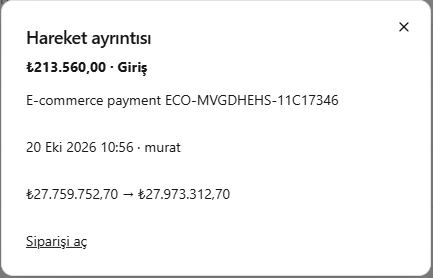
- Check whether the movement is incoming or outgoing and verify its amount.
- Review its date, staff member and description.
- Compare the balances before and after the movement.
- If an order is linked, use Open order (Siparişi aç) to view its details.
What is the order code in the description for?
The description E-commerce payment ECO-MVGDHEHS-11C17346 in the image identifies a payment for an e-commerce order. ECO-MVGDHEHS-11C17346 is that order’s code; it identifies which order the payment belongs to.- Check the order code in the description to identify the order related to the movement.
- Click Open order (Siparişi aç) at the bottom of the window.
- Compare the order code and payment information with the movement amount.
Screenshot
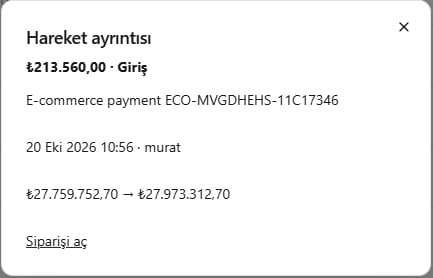
Movement details